


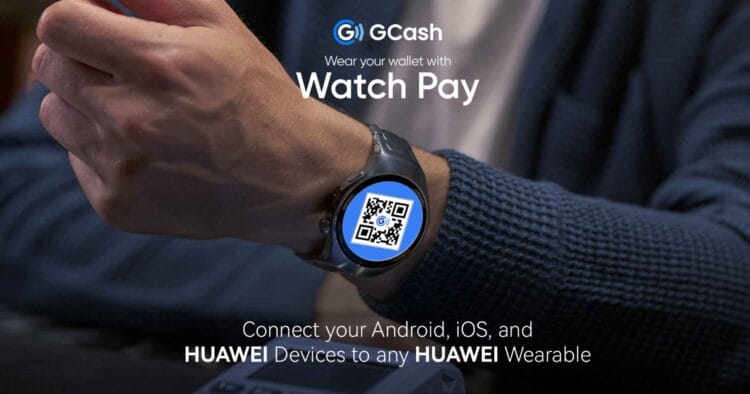
HUAWEI Philippines is making smarter, cashless living more accessible than ever with GCash Watch Pay, now available on iOS in addition to Android and HUAWEI devices. Users across all platforms can enjoy seamless and secure QR code payments straight from their wrist using the latest HUAWEI wearables including the HUAWEI WATCH GT 5 Series, HUAWEI WATCH FIT 3 & FIT 4 Series, HUAWEI WATCH D2, HUAWEI WATCH Ultimate, HUAWEI Band 10, and the HUAWEI WATCH 5, which is already supported on Android and HUAWEI devices and will soon be available on iOS. This aims to deliver truly inclusive cashless payment solutions to all users.
Pay Anytime, Anywhere on Any Device
GCash Watch Pay now works on iOS, Android, and HUAWEI phones, giving more Filipinos the freedom to pay in seconds straight from the wrist. GCash is the country’s leading finance super app. Trusted for shopping across millions of merchants, this expansion now lets iPhone users enjoy the same convenience, making everyday transactions easier and more secure.
Accessing GCash on HUAWEI Smartwatches
For HUAWEI Smartphones:
- Log in to their HUAWEI ID on their HUAWEI phone, ensuring the region is set to the Philippines.
- Connect the HUAWEI Health app to the HUAWEI smartwatch.
- Open the GCash mobile app and ensure the account is fully verified.
- On the HUAWEI smartwatch, navigate to Settings > Payment.
- Locate and install the GCash app on the smartwatch, then open it.
- Enter the GCash PIN and scan the QR code displayed on the GCash mobile app.
- Select Bind on the GCash mobile app.
- Once the linking is successful, both the GCash mobile app and the smartwatch will display confirmation.
For iOS and Android Devices:
- Download the HUAWEI Health app from the smartphone’s app store.
- Create a HUAWEI ID through the HUAWEI Health app, ensuring the region is set to the Philippines.
- Connect the HUAWEI Health app to the HUAWEI smartwatch.
- Open the GCash mobile app and ensure the account is fully verified.
- On the HUAWEI smartwatch, navigate to Settings > Payment.
- Locate and install the GCash app on the smartwatch, then open it.
- Enter the GCash PIN and scan the QR code displayed on the GCash mobile app.
- Select Bind on the GCash mobile app.
- Once the linking is successful, both the GCash mobile app and the smartwatch will display confirmation
By linking their GCash account to a HUAWEI smartwatch or fitness band, users get a dynamic QR code right on their wrist for instant scanning, making it easy to pay for coffee, commute fares, or daily essentials without a wallet. With this added flexibility, workouts, quick errands, and commutes become hassle-free, letting everyone enjoy the future of cashless convenience on HUAWEI’s latest wearables.
Tap Into Cashless Convenience with HUAWEI’s Latest Wearables
With GCash Watch Pay now available on iOS, more users can experience cashless convenience across HUAWEI’s full range of wearables. Leading the smartwatch and fitness band market, HUAWEI sets the standard with cutting-edge health, fitness, and lifestyle technologies, now enhanced by seamless cashless payments that bring everyday convenience straight to your wrist.
Experience Secure Seamless Payments Across All Devices on iOS, Android, and HUAWEI Right From Your Wrist
By extending its Watch Pay QR code payment system beyond HUAWEI wearables to iOS and Android devices, both GCash and HUAWEI are making inclusive digital finance accessible to users across all platforms.
Whether you are a HUAWEI user, an iPhone owner, or an Android fan, you can now enjoy the ease of cashless QR code payments right from your wrist. With GCash Watch Pay now available on the HUAWEI WATCH GT 5 Series, HUAWEI WATCH FIT 3 and FIT 4 Series, HUAWEI WATCH D2, HUAWEI WATCH Ultimate, HUAWEI Band 10, and the HUAWEI WATCH 5, which is already supported on Android and HUAWEI devices and will soon be available on iOS, everyday transactions are faster, more convenient, and safer with secure QR-based payments wherever you go.
HUAWEI Wearables are available on Shopee, Lazada, TikTok, HUAWEI Online Store and HUAWEI Experience Stores nationwide.
To learn more about GCash Watch Pay and HUAWEI’s line of wearable devices, visit HUAWEI’s official website or social media accounts (Facebook | Instagram).